A multi-effect you play with the trackpad or in front of the camera: left-right (X), up-down (Y) and pressure (Z) each hold an effect, and the spread between two fingers (W) a fourth one, out of 34. The pad shows your photos, which react to the effects and to your finger.
To install Wiiiiiicked Audio and find it in Live, see the installation guide.
The screen is in French. This manual keeps every on-screen word as you'll see it, and gives its meaning in italics the first time it appears in each part, like this: FIGER (freeze).
The interface at a glance
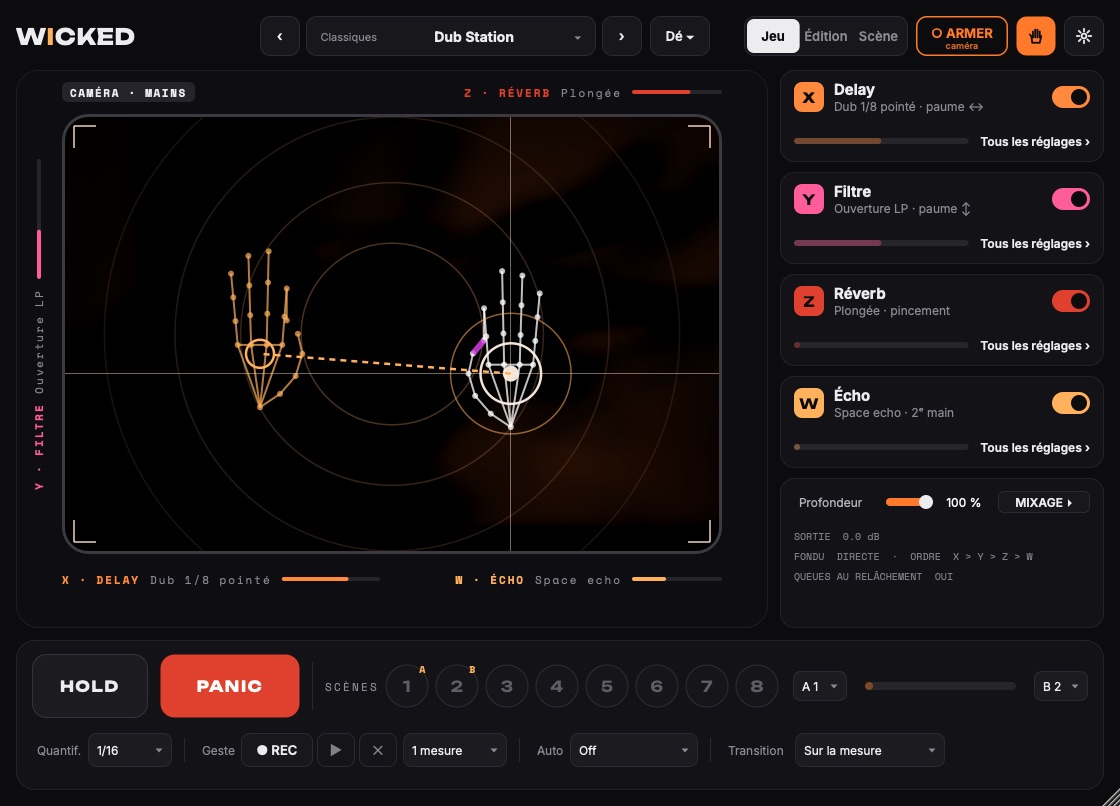
Click the numbers to tour the screen.Tap a number in the list to see it on the image.
- 1 The logo: its i's follow your playing, one at rest, up to twelve when you play hard.
- 2 The preset: ‹ › to step to the next one, the menu to search; Dé (die), next to it, draws a random pad. ⌘Z brings back the previous pad.
- 3 Three modes: Jeu (play) to play, Édition (edit) to set the effects (the pad stays playable), Scène (scene) for live.
- 4 ARMER (arm): one click arms the trackpad, another disarms it (or Caps Lock, out of the box). Orange when the pad is playing.
- 5 The camera: its menu picks hands or face; once on, it plays. Then the Réglages (settings).
- 6 The pad: left ↔ right plays effect X, down ↔ up effect Y, pressure effect Z, the spread of two fingers (or of your two hands) effect W.
- 7 Each effect's name and its meter, around the pad.
- 8 The four axis cards: the effect, its preset, the gesture. A click opens Édition (edit).
- 9 The mix: the depth; MIXAGE ▸ (mix) opens the output, the crossfade, the order and the tails, written in gray when it's closed.
- 10 HOLD keeps the effect when you lift your finger; PANIC cuts everything.
- 11 The eight scenes and the A ↔ B crossfader.
- 12 In time: quantization, the gesture loop, the autopilot and the Montée (rise), the scene transition.
-
At the top:
- the logo, whose number of “i”s follows your playing: 1 at rest, 2 when armed, up to 12 when you play hard;
- the preset ‹ › and its menu, which starts with “Chercher un preset…” (search for a preset…);
- Dé ▾ (die) (a random pad, or a variation) in Jeu (play) mode, Enregistrer (save) in Édition (edit) mode;
- Jeu | Édition | Scène (play | edit | scene);
- ARMÉ (armed): solid orange when the pad is playing, with what arms it shown underneath (Verr. Maj., bouton, toujours (Caps Lock, button, always)). A click on it arms the pad by button, without Caps Lock (as in Wiiiiiicked MIDI); another click disarms it;
- the Caméra (camera) and Réglages (settings) icons.
-
The pad, a big 3:2 rectangle with playable corners, surrounded by:
- the names of the effects and their live meters: X under the pad on the left, W under the pad on the right, Y running vertically on the left, Z above on the right;
- the status badges above it: GRILLE (grid), GESTE (gesture), AUTO, CAMÉRA (camera), and ACCORDÉ (tuned) with Wiiiiiicked MIDI;
- a message strip underneath, which tells you how to arm, what to show the camera, and so on. Its edge is orange when the pad is armed, gray when it isn't.
-
Jeu mode (the default), to the right of the pad:
- four axis cards: the effect, its preset, the gesture, and an Actif (active) switch that turns the effect off without opening anything. A click on the card opens Édition mode on that axis;
- the mix card: Profondeur (depth), and MIXAGE ▸ (mix), which opens Sortie (output), Fondu (fade), Ordre (order) and Queues au relâchement (tails on release) (settings you make once). When it's closed, their values stay written in gray. In Édition, everything is open.
- Édition mode: the edit panel takes the place of the cards, and the pad stays big and playable. ‹ Retour au jeu (back to play) takes you back to Jeu mode.
- Scène mode, for playing on stage: the pad gets bigger and only the essentials are left, on a single row at the bottom: HOLD (the effect holds when you lift your finger), PANIC (everything cuts out), the 8 scenes and the crossfader. At the top, the RÉACTIVITÉ (response) slider: to the right the effect follows your finger instantly, to the left it glides smoothly. It's the same setting as Lissage (smoothing) in the Réglages. Jeu brings the cards back.
-
The bottom bar, the same in Jeu mode and in Édition mode:
- first row: HOLD, PANIC, the 8 scenes and the A ↔ B crossfader;
- second row: quantization, the gesture loop, the autopilot and the scene transition.
- The Réglages open as a panel on the right. The pad stays visible so you can try things live, and HOLD and PANIC stay within reach.
1. Playing
- Put the mouse pointer on the plug-in window, on the pad.
- Turn on Caps Lock ⇪ (on screen: Verr. Maj.): the button at the top right changes to “● ARMÉ” (armed), the pad's edge turns orange and the logo gets a second I.
- Put a finger on the trackpad and move it. Left ↔ right controls effect X, down ↔ up effect Y, and how hard you press controls the pressure effect.
- Lift your finger: the effect stops. Delays and reverbs let their tails ring out if the option is ticked.
- Turn Caps Lock off to get a normal trackpad back.
Without Caps Lock: a click on ARMER (arm) arms the pad (the activation switches to “Bouton ARMER” (arm button)); another click disarms it. To go back to Caps Lock: Réglages (settings) › Activation.
Several Wiiiiiicked open (Audio or MIDI): with Caps Lock, only the last window opened or clicked plays from the trackpad. The others wait and show “autre fenêtre” (other window) under ARMÉ: click in one of them to give it the trackpad. If the instance that had it goes away, the trackpad is freed after 2 seconds. With the ARMER button or “Toujours actif” (always on), every window follows your finger. The camera isn't affected: every window that has its camera on plays from it.
A few tips:
- While you play, the pointer stays frozen (adjustable). So your finger doesn't send the mouse wandering around Live.
- Keep the pointer on the photo: with two fingers, macOS sends a scroll to the window under the pointer. On the plug-in it does nothing; on Live, it would scroll the Arrangement.
- Avoid three- and four-finger gestures: macOS uses them for Mission Control and for switching desktops.
- A firm click (hard press) lands on the photo, which is harmless. Avoid “Tap to click” anywhere other than on the plug-in.
- HOLD keeps the effect at its last position when you lift your finger.
- No trackpad: click and drag right on the photo with the mouse.
PANIC and Dé (die)
- PANIC (under HOLD) cuts all the effects and their tails dead in 20 ms. It also stops HOLD, the gesture loop and the autopilot. The pad then ignores your hand until it lifts: the strip under the pad says so (with the camera, take your hand out of the frame; in face mode, PANIC pauses the face, and a thumbs-up starts it again). It's also a Live parameter, “Panique” (panic): assign it to a button on your MIDI controller (Live's MIDI Map mode).
-
Dé (to the right of the preset name) offers three choices, and a way back:
- ↶ Le pad d'avant (the previous pad) (also ⌘Z, or at the top of the preset menu): the pad from before the last Dé, the last variation, the last preset or the last recalled scene comes back; a 2nd ⌘Z brings back the one you were leaving;
- nouveau pad au hasard (new random pad), with effects suited to each axis: X makes things move, Y gives space, pressure gives intensity, W the throws;
- variation légère (light variation) of the current pad;
- variation forte (strong variation).
Mix, feedback, drive and reverb length are capped so everything stays playable live: 200 draws went through the test bench. A pad you like is saved with “Enregistrer” (save).
Scenes
The scenes, in the bottom bar, keep 8 complete snapshots of the pad: the 4 effects and their settings, the fade, the order, the quantization, the autopilot and the gesture length. They're saved with the Live Set.
- Click an empty scene: saves the pad into it as it is.
- Click a full scene: recalls it. The current scene is lit in cyan.
- Right-click: recall, replace with the current pad, or clear.
-
Transition (menu on the right):
- Immédiate (immediate);
- Sur la mesure (on the bar): the scene blinks, then lands right on the next bar;
- Fondu 1 mesure (1-bar fade) or Fondu 4 mesures (4-bar fade): the settings glide from one scene to the other. An effect that changes from one scene to the other switches at the start of the fade. At the end of the fade, the effects that glided keep sounding: their echoes and their tails aren't cut. A Dé, a variation or a setting you touch during the fade stops it: your move is the one that stays.
The A ↔ B crossfader, at the end of the row, fades between two scenes by hand:
- choose the starting scene in A and the destination scene in B;
- slide the fader: on the left it's scene A, on the right scene B, and you can go back;
- the settings of the effects that are in both scenes blend from one to the other. The rest (a different effect, the order, the fade, the modulations) switches at the middle of the fader;
- the quantization, the autopilot and the gesture length don't move;
- the fader does nothing until A and B are saved, and choosing A or B doesn't change the pad: only the fader does;
- it can be assigned to a knob or a fader on your controller (see below).
For a set: prepare one scene per song, or per section of a song, then chain them from your MIDI controller.
Controlling it over MIDI (Live's MIDI Map mode)
These commands are plug-in parameters that you can assign to buttons on your controller, in AU as well as in VST3:
- Panique;
- Geste : REC (gesture: REC) and Geste : lecture / stop (gesture: play / stop);
- Dé : pad au hasard (die: random pad) and Dé : variation (die: variation);
- Preset précédent (previous preset) and Preset suivant (next preset);
- Scène 1 to Scène 8 (scene 1 to scene 8), and Transition de scène (scene transition);
- Crossfader A ↔ B, Crossfader : scène A and Crossfader : scène B;
- Rotation (2 doigts) (rotation, 2 fingers), the virtual knob of the two turning fingers (see below).
To assign them: expand the plug-in in Live to see its parameters. Switch to MIDI Map mode (⌘M), click the parameter, press the button on your controller, then leave MIDI Map mode. One press triggers the action, and the parameter goes back to zero by itself. Quantification (quantization), Longueur du geste (gesture length), Auto-pilote (autopilot), HOLD, Profondeur (depth) and Sortie (output) are assigned the same way.
Two fingers: the spread (W) and rotation
Put down a second finger while you play:
- The spread between the two fingers controls the 4th effect, W. Fingers together = start of the axis, fingers apart (8–9 cm) = end. The W effect plays as long as both fingers are down, and stops when the second one lifts.
- The first finger stays in charge of X, Y and pressure.
- Turning the two fingers sets the depth, like a knob: to the right for more effect, to the left for less. The first 20 degrees don't count, so that simply spreading your fingers doesn't change the depth.
- If a modulation in the Mod tab has Rotation (2 doigts) as its source, turning sets that knob instead of the depth: for example the reverb's size, or a filter's frequency (see 4). The knob stays where you left it, and Live records its moves just like the pad's.
- A palm or a wrist resting on the trackpad (a large contact area) isn't taken for a finger.
The pad draws a dotted line between your fingers, a ring whose size follows the spread, and the arc of the knob you're turning, with its name: “PROFONDEUR”, or “MOD 2” when it's a modulation. Both functions can be turned off in the Réglages: “Deux doigts, deux mains ou les sourcils jouent l'effet W” (two fingers, two hands or the eyebrows play the W effect) and “Tourner deux doigts (ou pencher la tête) règle la profondeur” (turning two fingers, or tilting your head, sets the depth). In camera mode, it's the spread between your two hands that plays W (see 2). The gesture loop records the spread too.
Fondu (fade): coming in without a jolt
The Fondu menu, in the mix card (under MIXAGE ▸ (mix) in Jeu (play) mode), sets how fast the effects come in when your hand lands, then leave when it lifts:
- Directe (direct): 6 ms, for stutters and the slicer;
- Souple (smooth): 60 ms;
- Douce (gentle): 150 ms;
- Lente (slow): 400 ms, for pads.
The fade is saved with the pad preset. The “Live” presets use it so your hand can come in anywhere without a click.
Recording your performance
The host parameters Pad X, Pad Y, Pression (pressure), Toucher (touch), Ecart (2 doigts) (spread, 2 fingers) and Deux doigts (two fingers) follow your fingers. Arm automation in Live (the Arrangement's ● button) and play: Live records your gestures, then plays them back without the trackpad. The gesture loop and the autopilot (below) don't write automation.
Playing in time (bottom bar, second row)
Quantif. (quantize) The looper and the slicer start and stop on the grid of Live's tempo, from 1/32 to 1 bar. A new instance starts on 1/16: the loop starts on the next sixteenth note (125 ms at most at 120 BPM), instead of stuttering at the exact instant of your finger. Off makes it start right away. They capture what they repeat at the instant they start, and on the grid, the loop lands right. Put your finger down a little early: the repeat starts right on the next step. A very short tap still plays a whole step. All the other effects (filters, delays, reverbs…) react right away, whatever the grid. While a rhythmic effect is waiting, the badge shows “GRILLE … · attente” (grid … · waiting).
When quantization is on and a rhythmic effect is loaded, the “GRILLE” badge lights up above the pad, which draws the cells of the stepped settings, like the delay's divisions or the slicer's slices. X's cells are orange and named at the top, Y's are pink and named on the right. The cell you're playing in lights up.
Geste (gesture): the motion recorder.
- Choose the length of the loop, from 1 beat to 4 bars.
- Click ● REC. The button blinks and the “● REC · POSE LE DOIGT” (put your finger down) badge lights up above the pad.
- Play. Recording starts at your first touch and lasts exactly the chosen length, locked to Live's bars. You can lift your finger along the way: the silences are part of the loop.
- At the end, the pad replays your gesture on a loop (“▶ GESTE”) and its trail shows faintly over the photo. Put your finger down to take over again; lift it, and the loop starts again.
The ▶ / ■ button starts or stops the loop, and ✕ clears it. Clicking REC again while it's waiting cancels the recording. The loop is saved with the Live Set. It follows Live's playback position, so it stays in time after a stop or a jump. When the transport is stopped, it runs at the project's tempo.
Auto: the pad moves by itself, one round per chosen length.
- Cercle (circle) and Huit (figure eight): the finger follows the shape.
- Va-et-vient ↔ (back and forth): X sweeps across the pad, Y stays where your finger left it.
- Va-et-vient ↕: Y sweeps across the pad, X stays where your finger left it.
- Aléatoire (random): glides from point to point. The points are drawn at random, but they're the same at the same place in the song.
- Montée (rise): a timed rise, just once. From the next bar, the dot travels from the bottom-left corner to the top-right corner, pressing harder and harder, over the gesture length (one bar at least), then lifts right on the 1. Auto then goes back to Off. With “Montée 8 mesures” (8-bar rise), “Ascenseur” (elevator) or “Aspiration spectrale” (spectral inhale), it's the build-up of a set in a single gesture.
- Montée avec le MIDI (rise with the MIDI): the same rise, at every MONTÉE in Wiiiiiicked MIDI, at the same time as it, with the drop on the same 1. Auto stays on it and waits for the next one.
Pressure stays at its minimum. Your finger takes over as soon as it touches, and a gesture loop that's playing comes before the autopilot.
In Live: Quantification, Longueur du geste and Auto-pilote are Live parameters. You can automate them or assign them to a MIDI controller.
2. Camera mode: playing with your hands or your face
- Click the Caméra (camera) icon at the top right and choose Les mains jouent (the hands play) or Le visage joue (the face plays) (or Caméra éteinte (camera off)). The icon then shows a hand or a face, and a “CAMÉRA” badge lights up above the pad. The first time, macOS asks you to allow Ableton Live to use the camera: accept. If you said no, go to System Settings › Privacy & Security › Camera, tick Ableton Live, then restart Live.
- Your camera's image, mirrored, replaces the photos, with the same visual treatments depending on the effects.
- Once it's on, the camera plays right away: no need for Caps Lock (on screen: Verr. Maj.), which is only for the trackpad. Under ARMÉ (armed), the button shows “caméra”. The only exception: in “Bouton ARMER” (arm button) mode (Réglages (settings) › Activation), click ARMER (arm).
-
Show your hand:
- hand in the picture = finger down, the effects kick in. Take your hand out of the frame to release;
- palm = X / Y. The pad's cursor sits exactly on your palm;
- pressure = pinching thumb and index finger (by default). In Réglages › Caméra, you can choose the hand close to the camera or a closed fist instead;
- in “Pression” (pressure), the “Bouche ouverte” (open mouth) option also works together with the hands: the palm gives the position, the mouth the pressure;
- second hand = effect W. The spread between your two palms controls it: hands close together = start of the axis, arms spread out to the edges of the picture = end. W plays as long as both hands are in the frame.
Your hand's skeleton is drawn on the picture, with the pinch in magenta. The second hand is drawn in W's color (amber), joined to the first one by a line.
The first hand is the one that came into the picture first. It keeps X, Y and pressure even if you cross your arms. If it leaves the frame, the hand that's left takes over. Rotating your two hands doesn't set the depth, unlike two fingers on the trackpad: as you move your arms, you'd change it without meaning to.
Good to know:
- The trackpad keeps priority: if it's touched, it's the one that plays.
- For good tracking: light, your whole hands in the frame, a background that isn't too busy. Step back a little so both hands fit in the picture with your arms spread.
- The camera stays on as long as the mode is active, even with the plug-in window closed (the green light shows it). The mode is saved with the project: the camera comes back on when you reopen it. To turn it off: Caméra › Caméra éteinte.
- Réglages › Caméra lets you choose the camera: FaceTime HD, an external camera, or an iPhone via Continuity.
Le visage joue (the face plays)
Your hands stay free for your instrument: it's your face that plays the pad.
| What you do | What it plays |
|---|---|
| Move your head | X and Y. Its movements are doubled so you can reach the corners |
| Open your mouth | the pressure (Z) |
| Raise your eyebrows | the W effect, like two fingers spread apart |
| Tilt your head to the side | the knob of the two turning fingers: toward your right shoulder for more, toward the left for less. Nothing below 15°, and the more you tilt, the faster it goes |
| Smile broadly | the Sourire (caméra) (smile, camera) source in the Mod tab, to connect to the setting of your choice |
| A wink held for a third of a second | the action chosen in Réglages › Caméra › Clin d'œil (wink) (none by default) |
Stopping everything without leaving the camera: show your open palm, all five fingers straight, for half a second. Everything stops as with PANIC: the effects in 20 ms, HOLD and the autopilot too. The “CAMÉRA · PAUSE” badge lights up, the strip under the pad says “Visage en pause” (face paused), and your face stops playing. To pick up again, raise your thumb, fist closed, for half a second. Switching the camera back to hands mode, or turning it off, also ends the pause.
Good to know:
- Eyebrows and smile are compared to your usual face, which the plug-in learns in a few seconds. Keep a neutral face at the start.
- A small smile with your mouth closed barely moves anything: what counts is a real smile, mouth wide. A wide-open mouth doesn't count as a smile.
- The wink is experimental. In test photos, big glasses often make it hard to see the closed eye, and squinting eyes can look like one. That's why it does nothing by default: try it out before you use it on stage.
- Tilting your head sets the depth, unless a modulation in the Mod tab has “Rotation (2 doigts)” (rotation, 2 fingers) as its source: then that's the setting that moves. Unticking “Tourner deux doigts (ou pencher la tête) règle la profondeur” (turning two fingers, or tilting your head, sets the depth) turns off both.
3. Choosing and setting the effects
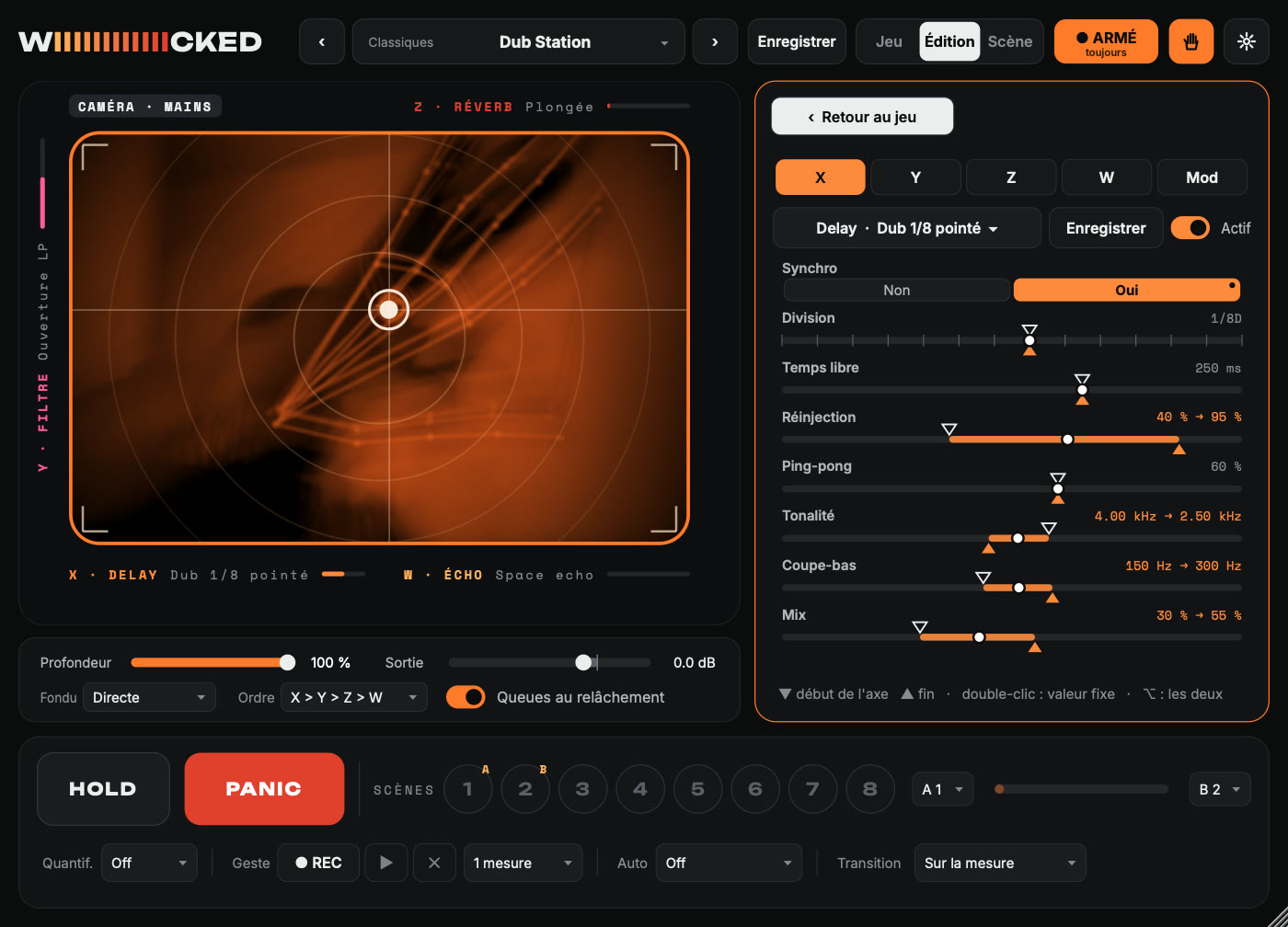
In Édition (edit) mode (a click on an axis card, or on “Édition” at the top), the X, Y, Z, W and Mod tabs open each slot. The effect menu starts with “Chercher un effet ou un preset…” (search for an effect or a preset…): type a few letters, with or without accents. For each slot:
- The button with the effect's name opens the menu: families → effects → factory presets, then your presets. At the top of the menu, Aucun effet (no effect) empties the slot.
- To test one effect at a time: preset menu (at the top) › Pad vide (aucun effet) (empty pad, no effect), then choose a single effect, for example on Y. Empty slots are kept in presets, scenes and the Set.
- Enregistrer (save) creates an effect preset. It then shows up under that effect's “Mes presets” (my presets).
- Actif (active) turns the slot off or back on.
Every parameter has two values:
- ▼ at the top: the value at the start of the axis (finger on the left, at the bottom, or a light press);
- ▲ at the bottom: the value at the end of the axis (finger on the right, at the top, a hard press, or fingers spread apart).
- Short lists (Type, Pente (slope), Synchro (sync)…) are buttons: a click gives the same value along the whole axis, ⌥-click picks only the end value.
- The white dot shows where you are right now.
To work them:
- drag in the top half → start, in the bottom half → end;
- ⌥-drag: moves both together;
- double-click: fixed value (end = start);
- right-click: fixed value, reverse the direction, default value.
4. Modulations (the “Mod” tab)
The last tab in Édition (edit) mode, Mod, moves the settings without you touching the pad. It has three parts.
Two tempo-synced LFOs, from 1/64 to 4 bars. Shapes: sine, triangle, square, ramp, stepped random, smooth random. The random stays the same at the same place in the song.
The rise time of “Durée d'appui” (press duration), from 1 beat to 4 bars.
Four modulations. Each one pairs a source, a target and an amount, from −100 to +100% of the setting's travel (negative = in the other direction):
-
sources:
- X, Y, Pression (pressure), Écart (spread): an axis also controls a setting of another effect;
- Vitesse du doigt (finger speed): scribbling fast pushes the target;
- Durée d'appui: the target rises as long as your hand stays down;
- LFO 1 and LFO 2;
- Niveau d'entrée (input level): the incoming sound (for example a reverb that opens up in the breaks);
- Sidechain, in VST3: the track sent to the sidechain;
- Rotation (2 doigts) (rotation, 2 fingers): a knob you turn with two fingers, or by tilting your head in face mode. As soon as a modulation uses it, rotation no longer sets the depth;
- Sourire (caméra) (smile, camera): your smile, in face mode;
- target: the Profondeur (depth) of all the effects, or any setting of X, Y, Z or W.
The yellow bar under each row shows the source live. The modulation adds to what the axis does, and only acts while the effect is playing. Modulations, LFOs and press duration are saved with the pad preset and with the scenes.
5. Pad presets
At the top, ‹ name › scrolls through the pad presets, and the name opens the menu, sorted by category. “Chercher un preset…” (search for a preset…), at the top of the menu, finds them by name or by category. A pad preset groups the 4 effects with their settings, the order of the chain, the fade and how the tails behave. Your saved presets also remember the quantization, the autopilot and the gesture length; factory presets don't touch those settings. W always comes last in the chain. Enregistrer (save) (in Édition (edit) mode, or “Enregistrer sous…” (save as…) in the menu) overwrites your preset, or asks for a name if it's a factory preset.
The “Live” presets
Of the 124 presets, 111 are “Live” presets, made for the stage: to play at a gig, on a song's master or on a track. The 9 marked modulé (modulated) also move by themselves, thanks to the modulations (see 4).
The 6 marked rotation can also be set by turning two fingers (see 4). The knob starts at zero, and turning it to the right:
- Pompe qui respire (breathing pump): digs the pump deeper;
- Pompe au doigt (finger pump): lengthens each pump stroke;
- Chœur gelé (frozen choir): makes the frozen pad sound shimmer;
- Gate qui respire (breathing gate): closes the filter;
- Clavier spectral (spectral keys): speeds up the Leslie;
- Tourne la salle (turn the room): makes the room bigger.
- Live · Master: on a full mix. The bottom-left corner is almost transparent. Reverbs and delays have a low cut, to keep the low end of the mix clean.
- Live · Transitions: rises, cuts, drops and rewinds. They're the ones allowed to hollow out the sound.
- Live · Batterie (drums), Voix (vocals), Basse & synthé (bass & synth), Guitare & claviers (guitar & keys) and Ambiances (ambiences): for a single track.
- Live · Accordés (tuned to the key): they sing the chord Wiiiiiicked MIDI is playing (see below).
All of them went through the test bench. The hand is placed at 15 spots on a mix at −1 dBFS: the corners, the center, a hard press, two fingers together or apart. The result is then compared to the dry sound. Every Live preset follows these rules:
- it never goes more than 4.5 dB above the dry mix;
- it doesn't create a hole: never below −15 dB on the master, −18 dB on a track, −35 dB for a transition (6 dB of leeway when all four effects are maxed out with two fingers);
- your hand coming in never causes a jump of more than 6 dB;
- everything has died away 6 seconds after the last release.
At rest, with no hand, the plug-in is bit-for-bit transparent. Its safety limiter only acts above 0 dBFS and caps at +1 dBFS.
The garde-fou de volume (volume guard) (Réglages (settings), on by default) stops the effects from making the sound louder than the loudest moment of the last 2 seconds of what comes in, which is about +3.5 dB above the average level. It never acts at rest, and it lets reverb tails ring during a break. Thanks to it, even the most violent “Classiques” (classics) presets (Destruction, Kaoss Classique, Tape Stop) stay under +4.5 dB. Two of them stand apart: DJ Kill can cut almost everything, and Cathédrale (cathedral) rings for a very long time (Sanctuary up to 30 s).
In the tables, a star (*) marks an effect preset tweaked for this pad.
Classiques (13)
| Preset | X | Y | Pressure | W (2 fingers) | Fade |
|---|---|---|---|---|---|
| Dub Station | Delay · Dub 1/8 pointé | Filtre (filter) · Ouverture LP | Réverb (reverb) · Plongée | Écho (echo) · Space echo | Directe (direct) |
| Kaoss Classique | Filtre · Acid | Delay · Divisions | Saturateur (saturator) · Chaleur | Flanger · Jet manuel | Directe |
| Breakbeat | Breakbeat Slicer · Break | Filtre · Montée HP | Bitcrusher · 8 bits | Réverb · Petite pièce | Directe |
| Space Echo | Écho · Space echo | Vintage Verb · Concert Hall 1970 | Flanger · Jet manuel | Grain Delay · Shimmer | Directe |
| Destruction | Bitcrusher · Destruction | Overdrive · Mur de son | Résonateur (resonator) · Métal | Filtre · Fermeture LP | Directe |
| Looper Live | Looper · Rétrécir | Filtre · Fermeture LP | Grain Delay · Shimmer | Delay · Ping-pong 1/8 | Directe |
| Nappes | Résonateur · Accord majeur | Plate · Infini | Phaser · Lent | Grain Delay · Nuage granulaire | Directe |
| Vinyle & Poussière | Distorsion vinyle (vinyl distortion) · Grenier | EQ · Téléphone | Écho · Bande magnétique | Filtre · Montée HP | Directe |
| Grains | Grain Delay · Nuage granulaire | Vintage Verb · Chorus Space | Filtre · Résonance | Réverb · Gel infini | Directe |
| DJ Kill | EQ · Kill basses | EQ · Kill aigus | Réverb · Gel infini | Filtre · Montée HP | Directe |
| Psyché | Phaser · Accélération | Flanger · Métallique | Delay · Auto-oscillation | Vintage Verb · Random Space | Directe |
| Tape Stop | Looper · Tape stop | Distorsion vinyle · Platine fatiguée | Saturateur · Lampe chaude | Réverb · Plongée | Directe |
| Cathédrale (parallèle) | Vintage Verb · Sanctuary | Plate · Étirement | Grain Delay · Pitch montant | Résonateur · Cordes sympathiques | Directe |
Live · Master (20)
| Preset | X | Y | Pressure | W (2 fingers) | Fade |
|---|---|---|---|---|---|
| Filtre DJ | Filtre · Fermeture LP * | Filtre · Montée HP * | Saturateur · Chaleur * | Réverb · Salle * | Douce (gentle) |
| Plongée douce | Filtre · Fermeture LP * | Écho · Bande magnétique * | Distorsion vinyle · Platine fatiguée * | Plate · Plate classique * | Douce |
| Écho de scène | Delay · Divisions * | Vintage Verb · Concert Hall 1970 * | Saturateur · Lampe chaude * | Filter Delay · Stéréo large * | Souple (smooth) |
| Bande usée | Distorsion vinyle · Platine fatiguée | Saturateur · Lampe chaude * | Écho · Bande magnétique * | EQ · Téléphone * | Douce |
| Cathédrale live | Réverb · Cathédrale * | Filtre · Fermeture LP * | Grain Delay · Shimmer * | Réverb · Gel infini * | Lente (slow) |
| Isolateur 3 bandes | EQ · Kill basses * | EQ · Kill aigus * | EQ · Balayage médium * | Réverb · Salle * | Souple |
| Chaleur analogique | Saturateur · Chaleur * | EQ · Brillance * | Overdrive · Crunch * | Plate · Plate classique * | Douce |
| Phaser de club | Phaser · Accélération * | Filtre · Montée HP * | Flanger · Métallique * | Delay · Dub 1/8 pointé * | Souple |
| Nuit blanche | Vintage Verb · Chorus Space * | Filtre · Fermeture LP * | Résonateur · Cordes sympathiques * | Grain Delay · Nuage granulaire * | Lente |
| Radio pirate | EQ · Téléphone | Bitcrusher · Sampler vintage * | Distorsion vinyle · Juste la poussière | Écho · Nuage | Souple |
| Grand écran | Flanger · Chorus large * | Plate · Plate brillante * | Phaser · Lent * | Delay · Ping-pong 1/8 * | Douce |
| Pompe club | Trance gate · Pompe * | Filtre · Fermeture LP * | Saturateur · Chaleur * | Vintage Verb · Shimmer * | Souple |
| Chorus géant | Chorus · Ensemble cordes * | Plate · Plate classique * | Trémolo / Pan (tremolo / pan) · Auto-pan lent * | Réverb inversée (reverse reverb) · Aspiration 1/2 * | Douce |
| Acid master | Acid 303 · Rond * | Delay · Ping-pong 1/8 * | Voyelles (vowels) · Murmure | Réverb · Salle * | Souple |
| Club tournant | Rotary · Discret | Filtre · Montée HP * | Saturateur · Chaleur * | Écho · Bande magnétique * | Douce |
| Spirale infinie | Frequency shifter · Spirale montante * | Filtre · Fermeture LP * | Pitch / Harmoniseur (pitch / harmonizer) · Harmonie quinte * | Vintage Verb · Shimmer * | Douce |
| Respiration · modulé | Filtre · Fermeture LP * | Réverb · Salle * | Saturateur · Chaleur * | Delay · Ping-pong 1/8 * | Douce |
| Réverb respirante · modulé | Vintage Verb · Concert Hall 1970 * | Filtre · Montée HP * | Chorus · Élargisseur | Delay · Dub 1/8 pointé * | Douce |
| Gel du DJ | Filtre · Fermeture LP * | Flou spectral (spectral blur) · Flou court * | Gel spectral (spectral freeze) · Gel au toucher * | Réverb · Salle * | Douce |
| Pompe qui respire · rotation | Trance gate · Pompe * | Filtre · Montée HP * | Saturateur · Chaleur * | Vintage Verb · Room 80s * | Souple |
Live · Transitions (20)
| Preset | X | Y | Pressure | W (2 fingers) | Fade |
|---|---|---|---|---|---|
| Montée 8 mesures | Filtre · Montée HP * | Delay · Divisions * | Réverb · Salle * | Flanger · Jet manuel * | Douce |
| Ascenseur | Filtre · Montée HP * | Réverb · Salle * | Flanger · Jet manuel * | Delay · Ping-pong 1/8 * | Douce |
| Coupure sèche | EQ · Kill basses | EQ · Kill aigus | Filtre · Montée HP * | Réverb · Gel infini * | Directe |
| Bégaiement | Looper · Stutter * | Filtre · Fermeture LP * | Bitcrusher · 8 bits * | Réverb · Salle * | Directe |
| Frein à main | Looper · Tape stop | Filtre · Fermeture LP * | Distorsion vinyle · Platine fatiguée | Écho · Space echo * | Souple |
| Aspiration | Looper · Reverse | Réverb · Plongée * | Filtre · Montée HP * | Grain Delay · Chute d'octave | Douce |
| Lancer de delay | Delay · Dub 1/8 pointé * | Filter Delay · Bande étroite * | Écho · Rafale 1/16 * | Plate · Plate classique * | Souple |
| Chute libre | Grain Delay · Chute d'octave * | Filtre · Fermeture LP * | Saturateur · Écrasement * | Réverb · Plongée * | Douce |
| Rembobinage | Breakbeat Slicer · Rembobinage | Distorsion vinyle · Pinch stéréo | Filtre · Montée HP * | Delay · Ping-pong 1/8 * | Souple |
| Sirène | Filter Delay · Bande étroite * | Phaser · Jet résonant | Delay · Auto-oscillation * | Réverb · Salle * | Douce |
| Aspiration inversée | Réverb inversée · Aspiration mesure | Filtre · Montée HP * | Delay inversé (reverse delay) · Envers 1/4 | Réverb · Gel infini * | Douce |
| Hachoir montant | Trance gate · Motifs en balayage | Filtre · Montée HP * | Bitcrusher · 8 bits * | Delay · Divisions * | Directe |
| Barber pole | Frequency shifter · Spirale montante * | Réverb · Salle * | Flanger · Jet manuel * | Pitch / Harmoniseur · Cascade | Douce |
| Descente d'octave | Pitch / Harmoniseur · Unisson → octave * | Filtre · Fermeture LP * | Trémolo / Pan · Hélicoptère * | Réverb inversée · Souffle court | Douce |
| Hélicoptère | Trémolo / Pan · Hélicoptère | Filtre · Fermeture LP * | Trance gate · Hachoir 1/16 * | Delay · Ping-pong 1/8 * | Souple |
| Montée automatique · modulé | Filtre · Montée HP * | Réverb · Salle * | Flanger · Jet manuel * | Delay · Divisions * | Douce |
| Doigt nerveux · modulé | Bitcrusher · 8 bits * | Filtre · Fermeture LP * | Flanger · Métallique * | Écho · Rafale 1/16 * | Souple |
| Gel de break | Filtre · Montée HP * | Gel spectral · Glisser vers le gel * | Flou spectral · Nuage | Réverb · Plongée * | Souple |
| Aspiration spectrale | Filtre · Montée HP * | Flou spectral · Brouillard * | Réverb inversée · Aspiration mesure | Gel spectral · Glisser vers le gel * | Souple |
| Squelette qui chute | Porte spectrale (spectral gate) · Squelette * | Filtre · Fermeture LP * | Bitcrusher · 8 bits * | Écho · Space echo | Directe |
Live · Batterie (16)
| Preset | X | Y | Pressure | W (2 fingers) | Fade |
|---|---|---|---|---|---|
| Break machine | Breakbeat Slicer · Shuffle groove | Bitcrusher · 8 bits * | Saturateur · Écrasement * | Réverb · Petite pièce | Directe |
| Roulement | Looper · Stutter * | Filtre · Montée HP * | Bitcrusher · Fréquence seule * | Delay · Divisions * | Directe |
| Salle de batterie | Vintage Verb · Room 80s * | Saturateur · Parallèle * | Plate · Caisse claire 80s * | Écho · Rafale 1/16 * | Souple |
| Concassé | Bitcrusher · Destruction * | Filtre · Fermeture LP * | Overdrive · Mur de son * | Flanger · Négatif | Souple |
| Dub drums | Delay · Dub 1/8 pointé * | Plate · Caisse claire 80s | Écho · Space echo * | Filtre · Montée HP * | Souple |
| Hachoir | Breakbeat Slicer · Hachoir | Phaser · Univibe * | Saturateur · Chaleur | Réverb · Petite pièce | Directe |
| Toms résonants | Résonateur · Glissando * | Filtre · Wah bande * | Réverb · Petite pièce | Delay · Ping-pong 1/8 * | Souple |
| Lo-fi beat | Distorsion vinyle · Vieux 45 tours | Bitcrusher · Sampler vintage * | Filtre · Fermeture LP * | Écho · Bande magnétique | Douce |
| Trance gate | Trance gate · Trance | Filtre · Fermeture LP * | Saturateur · Chaleur | Réverb · Petite pièce | Directe |
| Pompe sidechain | Trance gate · Pompe sidechain | Filtre · Montée HP * | Peigne (comb) · Métallique * | Réverb inversée · Aspiration 1/2 | Souple |
| Peigne tribal | Peigne · Tuyau * | Trance gate · Galop * | Overdrive · Crunch * | Delay inversé · Envers 1/8 | Souple |
| Ring kit | Modulateur en anneau (ring modulator) · Métal discret | Filtre · Montée HP * | Bitcrusher · 8 bits * | Plate · Caisse claire 80s | Souple |
| Batterie vivante · modulé | Trance gate · Trance | Filtre · Fermeture LP * | Saturateur · Chaleur | Réverb · Petite pièce | Directe |
| Pompe filtrée · modulé | Trance gate · Pompe sidechain | Filtre · Fermeture LP * | Peigne · Métallique * | Réverb inversée · Aspiration 1/2 | Souple |
| Gate élastique | Trance gate · Hachoir 1/16 * | Filtre · Fermeture LP * | Saturateur · Chaleur | Plate · Caisse claire 80s | Directe |
| Pompe au doigt · rotation | Trance gate · Pompe sidechain * | Porte spectrale · Éclats * | Overdrive · Crunch * | Réverb · Petite pièce | Souple |
Live · Voix (14)
| Preset | X | Y | Pressure | W (2 fingers) | Fade |
|---|---|---|---|---|---|
| Voix céleste | Plate · Voix * | Grain Delay · Shimmer * | Delay · Divisions * | Réverb · Cathédrale * | Douce |
| Mégaphone | EQ · Téléphone | Overdrive · Crunch * | Bitcrusher · Radio cassée * | Écho · Ducking voix | Souple |
| Doublage | Flanger · Chorus large * | Delay · Slapback | Grain Delay · Pitch montant * | Plate · Voix | Douce |
| Écho dub voix | Écho · Ducking voix * | Filtre · Montée HP * | Réverb · Plongée * | Delay · Tape glide | Souple |
| Robot chantant | Grain Delay · Robot | Résonateur · Accord majeur * | Bitcrusher · 8 bits * | Plate · Voix | Souple |
| Murmure | EQ · Téléphone * | Réverb · Lavage total * | Grain Delay · Nuage granulaire * | Distorsion vinyle · Juste la poussière | Lente |
| Chœur fantôme | Grain Delay · Nuage granulaire * | Vintage Verb · Chorus Space * | Résonateur · Mineur sombre * | Flanger · Chorus large | Lente |
| Chœur harmonisé | Pitch / Harmoniseur · Accord majeur | Vintage Verb · Shimmer * | Chorus · Ensemble cordes * | Delay inversé · Envers long | Douce |
| Talkbox | Voyelles · A-E-I-O-U | Filtre · Montée HP * | Saturateur · Lampe chaude * | Delay · Slapback | Souple |
| Voix à l'envers | Delay inversé · Envers 1/4 | Réverb inversée · Aspiration 1/2 | Pitch / Harmoniseur · Octave basse * | Plate · Voix | Douce |
| Robot vocodeur | Modulateur en anneau · Robot * | Voyelles · Voix grave | Bitcrusher · Radio cassée * | Écho · Ducking voix | Souple |
| Voix dansante · modulé | Trémolo / Pan · Auto-pan lent * | Plate · Voix | Pitch / Harmoniseur · Doublage | Delay · Divisions * | Douce |
| Robot chuchoteur | Robot / Chuchotement (robot / whisper) · Du robot au souffle * | Plate · Voix * | Porte spectrale · Squelette * | Delay · Slapback | Souple |
| Chœur gelé · rotation | Gel spectral · Nappe qui dérive * | Plate · Voix * | Pitch / Harmoniseur · Harmonie quinte * | Flou spectral · Nuage * | Douce |
Live · Basse & synthé (14)
| Preset | X | Y | Pressure | W (2 fingers) | Fade |
|---|---|---|---|---|---|
| Acid live | Filtre · Acid * | Delay · Ping-pong 1/8 * | Saturateur · Lampe chaude * | Réverb · Salle * | Souple |
| Basse grasse | Overdrive · Basse grasse * | Filtre · Fermeture LP * | Saturateur · Octave fuzz * | Phaser · Lent | Souple |
| Synthé spatial | Delay · Ping-pong 1/8 * | Vintage Verb · Random Space * | Filtre · Wah bande * | Grain Delay · Synchro 1/8 | Douce |
| Pad infini | Plate · Infini * | Phaser · Lent | Résonateur · Accord majeur * | Réverb · Gel infini * | Lente |
| Arpège fou | Grain Delay · Synchro 1/8 * | Delay · Divisions * | Bitcrusher · 8 bits * | Filter Delay · Stéréo large | Souple |
| Sub contrôle | Filtre · Fermeture LP * | Saturateur · Chaleur * | Overdrive · Wah saturé * | Flanger · Négatif | Souple |
| Résonance métallique | Résonateur · Métal * | Filtre · Résonance * | Flanger · Métallique * | Plate · Plate brillante | Douce |
| TB-303 | Acid 303 · Squelch | Delay · Ping-pong 1/8 * | Saturateur · Lampe chaude * | Réverb inversée · Souffle court | Souple |
| 303 hurlante | Acid 303 · Hurlement | Voyelles · Ouah-ouah * | Overdrive · Crunch * | Delay · Divisions * | Souple |
| Synthé tournant | Rotary · Lent → rapide | Chorus · Années 80 | Modulateur en anneau · Métal discret | Vintage Verb · Bright Hall 1980 * | Douce |
| Trance lead | Trance gate · Motifs en balayage * | Pitch / Harmoniseur · Harmonie quinte | Delay · Ping-pong 1/8 * | Vintage Verb · Shimmer * | Souple |
| Acid automatique · modulé | Acid 303 · Squelch | Delay · Ping-pong 1/8 * | Saturateur · Lampe chaude * | Réverb inversée · Souffle court | Souple |
| Synthé fantôme | Porte spectrale · Fantôme * | Filtre · Fermeture LP * | Robot / Chuchotement · Robot * | Flou spectral · Flou court | Souple |
| Gate qui respire · rotation | Trance gate · Trance * | Filtre · Fermeture LP * | Saturateur · Lampe chaude | Delay · Ping-pong 1/8 * | Directe |
Live · Guitare & claviers (10)
| Preset | X | Y | Pressure | W (2 fingers) | Fade |
|---|---|---|---|---|---|
| Shoegaze | Réverb · Lavage total * | Flanger · Chorus large | Overdrive · Mur de son * | Grain Delay · Shimmer | Lente |
| Wah-wah | Filtre · Wah bande * | Overdrive · Crunch * | Phaser · Univibe | Delay · Slapback | Souple |
| Ampli à lampes | Saturateur · Lampe chaude * | EQ · Brillance | Overdrive · Lead hurlant * | Vintage Verb · Bright Hall 1980 * | Douce |
| Rhodes vintage | Phaser · Univibe * | Vintage Verb · Chambre sombre | Distorsion vinyle · Vieux 45 tours | Delay · Tape glide | Douce |
| Ébullition | Grain Delay · Nuage granulaire | Filter Delay · Balayage | Résonateur · Glissando * | Réverb · Salle * | Douce |
| Leslie | Rotary · Lent → rapide | Overdrive · Crunch * | Chorus · Chorus doux | Réverb · Salle * | Douce |
| Trémolo surf | Trémolo / Pan · Vintage ampli | Plate · Plate brillante | Overdrive · Crunch * | Écho · Bande magnétique | Souple |
| Shimmer guitare | Vintage Verb · Shimmer * | Chorus · Élargisseur | Pitch / Harmoniseur · Harmonie quinte * | Delay inversé · Envers long | Lente |
| Spectres | Porte spectrale · Éclats * | Flou spectral · Étalement * | Gel spectral · Cristal figé * | Vintage Verb · Shimmer * | Douce |
| Clavier spectral · rotation | Robot / Chuchotement · Du robot au souffle * | Rotary · Lent → rapide | Gel spectral · Gel au toucher * | Vintage Verb · Chorus Space * | Douce |
Live · Ambiances (11)
| Preset | X | Y | Pressure | W (2 fingers) | Fade |
|---|---|---|---|---|---|
| Brume | Vintage Verb · Sanctuary * | Filtre · Fermeture LP * | Grain Delay · Nuage granulaire | Réverb · Gel infini * | Lente |
| Océan | Flanger · Jet manuel * | Réverb · Lavage total * | Distorsion vinyle · Juste la poussière | Écho · Nuage | Lente |
| Cristal | Résonateur · Jazz * | Plate · Plate brillante | Grain Delay · Shimmer | Delay · Ping-pong 1/8 * | Lente |
| Souterrain | Filtre · Fermeture LP * | Réverb · Cathédrale * | Résonateur · Mineur sombre | Écho · Space echo | Lente |
| Cathédrale shimmer | Vintage Verb · Shimmer * | Filtre · Fermeture LP * | Pitch / Harmoniseur · Cascade | Réverb inversée · Fantôme | Lente |
| Abysses | Vintage Verb · Abysses * | Frequency shifter · Spirale descendante * | Peigne · Corde | Delay inversé · Envers long | Lente |
| Cloches lointaines | Modulateur en anneau · Cloches * | Plate · Plate brillante | Peigne · Accordé La | Chorus · Ensemble cordes | Lente |
| Marée · modulé | Vintage Verb · Shimmer * | Filtre · Fermeture LP * | Frequency shifter · Phaser fantôme * | Delay inversé · Envers long | Lente |
| Nappe gelée | Gel spectral · Nappe qui dérive * | Filtre · Fermeture LP * | Flou spectral · Brouillard * | Plate · Plate brillante | Lente |
| Tourne la salle · rotation | Vintage Verb · Sanctuary * | Filtre · Fermeture LP * | Flou spectral · Brouillard * | Gel spectral · Cristal figé * | Lente |
| Chuchotements | Robot / Chuchotement · Chuchotement * | Réverb · Cathédrale * | Porte spectrale · Ne garder que l'air * | Delay inversé · Envers long | Lente |
Live · Accordés (6)
They sing the chord Wiiiiiicked MIDI is playing (with its AUDIO button on): their resonator, their comb or their pitch effect takes its notes. Without the MIDI, they keep their own. A pink ACCORDÉ · Am7 (tuned · Am7) badge lights up above the pad when they follow it.
| Preset | X | Y | Pressure | W (2 fingers) | Fade |
|---|---|---|---|---|---|
| Toms qui chantent | Résonateur · Cordes sympathiques * | Filtre · Fermeture LP * | Saturateur · Chaleur | Plate · Caisse claire 80s | Souple |
| Charleys en peigne | Peigne · Métallique * | Filtre · Montée HP * | Résonateur · Métal * | Réverb · Petite pièce | Souple |
| Chœur de l'accord | Pitch / Harmoniseur · Harmonie quinte * | Réverb · Plongée | Résonateur · Accord majeur * | Écho · Space echo | Douce |
| Nappe accordée | Résonateur · Accord majeur * | Plate · Infini | Phaser · Lent | Pitch / Harmoniseur · Cascade | Lente |
| Basse qui résonne | Peigne · Tuyau * | Filtre · Fermeture LP * | Overdrive · Crunch * | Résonateur · Glissando * | Souple |
| Cloches du drop | Résonateur · Métal * | Vintage Verb · Concert Hall 1970 | Pitch / Harmoniseur · Unisson → octave * | Delay · Dub 1/8 pointé | Douce |
6. The effects (34)
| Family | Effect | What you can set |
|---|---|---|
| Filtres | Filtre | type (low-pass, band-pass, high-pass, notch), 12/24 dB slope, frequency, resonance, drive |
| EQ | lows, mids (gain, frequency, Q), highs (from −30 to +12 dB, DJ-isolator style), low cut, high cut | |
| Acid 303 | saturated 4-pole filter, TB-303 style: frequency, resonance, Env Mod and decay (the filter opens on every hit), accent (more resonance on the loud hits), drive; level regulated automatically | |
| Voyelles | a filter that “talks”: vowel A → E → I → O → U along the axis, voice (deep → child), resonance, drive | |
| Peigne | comb filter tuned to a note: feedback ± (negative = hollow, pipe-like sound), damping, stereo | |
| Résonateur | note, chord (10 types), decay, brightness, width, input filter | |
| Distorsions | Saturateur | drive, 6 curves (analog, soft, hard, tube, foldback, rectifier), color, asymmetry |
| Overdrive | filter and bandwidth, drive, tone, dynamics | |
| Distorsion vinyle | tracing, stereo pinch, crackle (density, volume), wear (wow), bandwidth, surface noise | |
| Bitcrusher | resolution (1–16 bits), sample rate, drive, instability, smoothing | |
| Modulation | Phaser | rate, depth, frequency, feedback ±, 2 to 12 stages, stereo |
| Flanger | delay time (manual “jet” sweep), depth, rate, feedback ±, stereo | |
| Chorus | chorus or 3-voice ensemble (string machine style): rate, depth, delay time, feedback, width | |
| Trémolo / Pan | volume (or left/right balance: auto-pan) following an LFO, tempo-synced or free; sine, triangle, square, ramp | |
| Rotary | rotating speaker (Leslie): horn and drum each at their own speed, slow → fast with inertia, drive, width | |
| Modulateur en anneau | carrier (1 Hz → 4 kHz: wobble, bells, robot), LFO on the carrier, sine or square, stereo | |
| Frequency shifter | shifts every frequency by the same number of hertz; with feedback, endless spirals going up or down (“barber pole”) | |
| Pitch / Harmoniseur | transposes by musical intervals (−2 oct → +2 oct), 2nd voice for chords, fine detune, delay and feedback (cascades) | |
| Délais | Delay | tempo sync or free time (glides like tape), feedback up to 110% (self-oscillation), ping-pong, tone, low cut |
| Écho | tape-echo style: filter, wobble, grit, diffusion, ducking | |
| Filter Delay | 3 delays left / center / right, each with a band-pass: frequency, resonance, spread | |
| Grain Delay | pitch ±24 semitones, spray, grain frequency, random pitch, feedback | |
| Delay inversé | the sound comes back played backward, in synced slices (1/16 → 1/2); with feedback, the repeats change direction | |
| Réverbs | Réverb | size, decay, pre-delay, damping, low cut, diffusion, width, freeze |
| Plate | Dattorro plate: decay, damping, bandwidth, diffusion, modulation, size | |
| Vintage Verb | 9 modes (Concert Hall, Bright Hall, Plate, Room, Chamber, Random Space, Chorus Space, Ambience, Sanctuary), 3 colors (1970 dark, 1980 grainy, Now), modulation, high / low cut, shimmer (the transposed tail goes back into the reverb: +1 oct, +fifth, +oct+fifth, −1 oct) | |
| Réverb inversée | the reverb tail played backward: it swells up toward the sound instead of following it; synced swell length, decay, size, tone | |
| Rythmique | Looper | loops the last N beats at the moment you touch, locked to the grid. Length, speed (negative = backward, 0 = tape stop), hold, overdub |
| Breakbeat Slicer | cuts the last bar into 4 to 32 slices and plays them back rearranged (Break, Stutter, Shuffle, Gate, Aléatoire (random)…), randomness, reverses, pitch, gate | |
| Trance gate | volume chopped over 16 steps locked to the bar: 10 patterns + Perso (custom) (16 clickable cells in the edit panel; the step being played is circled in white), steps from 1/32 to 1/8, depth, length, swing, attack and release (how gently it opens and closes), stereo (even steps on the left, odd on the right). Pompe (pump) and Pompe croches (eighth-note pump): a tempo-synced sidechain effect. Pompe sidechain (sidechain pump): follows the track sent to the sidechain, in VST3 (see below) | |
| Spectral | Gel spectral | on every touch, freezes the spectrum of that instant into an endless wash of sound: freeze (from the dry sound to the frozen sound), drift (the wash slowly soaks up what comes in), shimmer, low cut, high cut. It fades out in about a second when your hand lifts |
| Flou spectral | every frequency lights up fast and dies away slowly: blur (0.1 to 4 s), smearing onto neighboring frequencies, diffusion, low cut. A cloud of the sound, without a reverb's echoes | |
| Robot / Chuchotement | keeps the sound's spectrum and replaces its phases: a robot voice buzzing around 90 Hz, or a whispered breath; voice (from one to the other), low cut, high cut | |
| Porte spectrale | only lets through the frequencies above the threshold (relative to the loudest one): the sound is stripped down to its skeleton. Inverted (“Les faibles” (the weak ones)), it keeps the air and the breath. Threshold, softness; the lost level is made up (up to +12 dB) |
The spectral effects and their lag
The four spectral effects analyze the sound in chunks of 2048 samples. So their processed sound arrives about 43 ms late at 48 kHz. Only the processed sound is late, like a reverb's sound: the dry sound stays on time, and the plug-in reports no latency to Live, so the other presets have none.
When you touch, the dry sound holds the spot for about a tenth of a second, then fades into the processed sound: your hand never opens a hole. These effects suit pads, vocals and textures better than drum attacks. Each one uses about 0.4% of a CPU core.
Connecting a sidechain (Pompe sidechain)
The VST3 version of Wiiiiiicked Audio has a Sidechain input. The Audio Unit doesn't: Live refused to open the AU with that second input. So for the sidechain pump, insert the VST3 version. In Live, expand the plug-in: the Sidechain section appears under its settings. Turn it on and choose the kick drum track. With the “Pompe sidechain” pattern, the sound dips under every real kick hit, breaks included. With no sidechain connected, this pattern simply pumps on the beats.
Each effect's Mix and the overall Profondeur (depth) set the blend with the original sound. Ordre (order) chooses the chain: X → Y → Z, any other permutation, or all three in parallel (parallèle). A soft limiter on the output prevents self-oscillation accidents.
7. Settings (icon at the top right)
The Réglages (settings) open as a panel on the right, in two columns: playing on the left, camera and interface on the right. The pad stays visible and playable, so you can try a setting live. Fermer (close), or another click on the icon, closes them. The foot of the panel shows the version.
- Trackpad: all trackpads, the built-in trackpad only, or the Magic Trackpad only. The Magic Mouse is left out by default, otherwise holding it would trigger the effects.
-
Activation:
- Caps Lock (on screen: Verr. Maj.), recommended.
- Bouton ARMER (arm button), which you can also assign over MIDI in Live.
- Toujours actif (always on), for a Magic Trackpad dedicated to the plug-in.
- Écouter le trackpad dans cette instance (listen to the trackpad in this instance): turn it off on the other tracks if you use several Wiiiiiicked Audio.
-
Pression (pressure): Force Touch (real pressure) or surface de contact du doigt (finger contact area).
- Calibrer (5 s) (calibrate): touch lightly, then press hard, and the limits set themselves.
- By default, the range goes from 20 to 350, measured on a Magic Trackpad (finger resting ≈ 15–50, click ≈ 300 and up).
- Lissage (smoothing): finger inertia, from 3 to 200 ms. It adapts to the gesture: a big movement goes through almost instantly, a small one stays smooth. In Scène (scene) mode, it's also set with RÉACTIVITÉ (response).
- Garde-fou de volume (volume guard): on by default. The effects can't make the sound louder than the loudest moment of the last 2 seconds of what comes in.
- Deux doigts, deux mains ou les sourcils jouent l'effet W (two fingers, two hands or the eyebrows play the W effect) and Tourner deux doigts (ou pencher la tête) règle la profondeur (turning two fingers, or tilting your head, sets the depth): what the second finger, the second hand and the eyebrows do, to turn off if you'd rather play more simply.
- Caméra (camera): the camera, the hands' pressure gesture, and the clin d'œil (wink) action in face mode (none, variation, random pad, next scene, next preset). Hands or face are chosen from the Caméra icon's menu, and only there.
-
Interface:
- Taille (size): from 75% to 150%. You can also drag the bottom-right corner of the window, from 70% to 160%, and the proportions stay the same. The size is remembered with the Set.
- Visages (faces): the pad's photos (see below).
- Les i du logo suivent le jeu (the logo's i's follow your playing): on by default. Unticked, the logo keeps its 6 i's.
8. The pad screen
The photos, like the camera image, turn into high-contrast black and white tinted with orange. The effects add their own treatments on top. Subtle rings and four corner marks remind you that the corners of the pad are the corners of the trackpad.
The face's expression depends on the dominant effect (the axis pushed furthest) and on its intensity:
| Family | light → strong |
|---|---|
| Filtres | focused → pout → sideways glance |
| Distorsions | wink → grimace → sneer |
| Modulation | dreamy → sly → pout |
| Délais | sly → wink → scream |
| Réverbs | dreamy → low-angle shot → dive into the eye |
| Rythmique | low-angle shot → astonishment → scream |
| Spectral | dreamy → eye → astonishment |
Pressing very hard makes it scream; scribbling very fast brings on astonishment.
Using your own photos
Réglages (settings) › Interface › Visages (faces) › Ajouter un dossier de photos… (add a folder of photos…), then choose a folder. The plug-in copies the photos (JPEG, PNG, or HEIC from an iPhone) onto your Mac, next to your presets, then loads them in the background: reinstalling or uninstalling doesn't erase them.
-
A photo named after an expression goes to that expression:
sourire,plisse,moue,clin,grimace,rictus,malin,reveur,cri,cote,oeil,satisfait,stupeur. English names work too (smile,scream…). A photo namedavatarreplaces the portrait at the foot of the Réglages. - The other photos, with any name, fill in the rest: the most open mouths become the scream and the astonishment; face detection decides that on its own.
- If there are fewer than 13 photos, they're used more than once.
- Each photo is cropped to the detected face, which is also the zoom point.
The choice applies to every instance of the plug-in. It's remembered the next time you launch. The first choice in the Visages menu brings back the original photos. At rest, the face smiles; when armed, it stares at you; right after, it looks satisfied.
Each active effect processes the image: warmth and contrast (saturator, overdrive), pixels (bitcrusher, robot), sepia and dust (vinyl), blur (filter, spectral blur), color grading (EQ), ripples around your finger (resonator), rotating colors (phaser), doubled image (flanger), ghost echoes (delays), grainy shards (grain delay, spectral gate), glowing halo (reverbs), a frozen image pulsing to the tempo (looper, spectral freeze), slices shuffled to the tempo (slicer). Pressure zooms into the face. Changes of expression go through a transition specific to each family: iris, glitch, wave, echo, light fade, slices.
9. With Wiiiiiicked MIDI
Wiiiiiicked MIDI is the second plug-in: it plays your synths from the pad (its manual: the MIDI manual). The two talk to each other, with no cable or setup in Live:
- The effects tune themselves (the ACCORDÉ · Am7 (tuned · Am7) badge, and the Live · Accordés (tuned to the key) pads): when a MIDI instance has its AUDIO button on, the resonator takes the notes of the chord it's playing (the Note knob keeps the register), the comb takes the nearest chord note, and the pitch effect takes intervals that fall within the chord.
- The ear: as long as the MIDI window is open, Wiiiiiicked Audio listens to its track and gives it the key it hears. One click on the MIDI side takes it as the key and scale.
- Linked scenes: on the MIDI side, a scene can recall Wiiiiiicked Audio's scene with the same number at the same time; both land on the same 1.
- The MONTÉE (rise): with Auto › Montée avec le MIDI (rise with the MIDI), the audio rises with every MONTÉE in Wiiiiiicked MIDI and lifts with its drop.
- The trackpad: with Caps Lock (on screen: Verr. Maj.), only one window plays at a time (see “1. Playing”).